
Your child's book, from day one.
Photos, videos, voices, appointments and stories in one place. Together with the whole family, and one day your child takes over their own book.
KeyMoments is on the App Store in Ireland, the Netherlands, Belgium, Luxembourg, France, Germany, Austria and Switzerland.
No sign-up, no account · For iPhone and iPad · The first month is free
Everything that makes a childhood
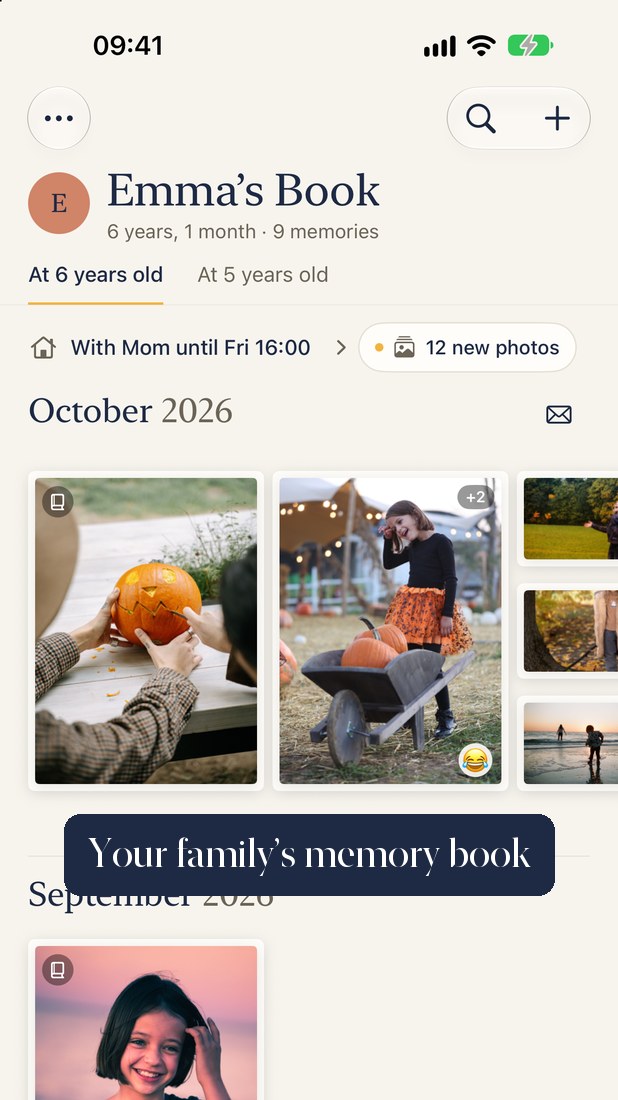
KeyMoments gathers the loveliest moments almost on its own, and turns them into a book that grows with your child.
Take a look first
What does a full book look like? Our example with the made-up family of Emilia and Noah shows you. The pictures are made with AI and labelled as such.
No sign-up
No account, no password, no email address. Download the app and start: your Apple ID is enough. Grandma and grandpa join with one tap.
Photos find themselves
The app recognises your child in your photos and videos and suggests ready entries with place and date. The face recognition takes the age in the picture into account and rarely mixes up siblings, all on your iPhone. It also learns mum, dad, grandma and grandpa, and gets better with every photo you confirm.
Pinboard and a book to flip through
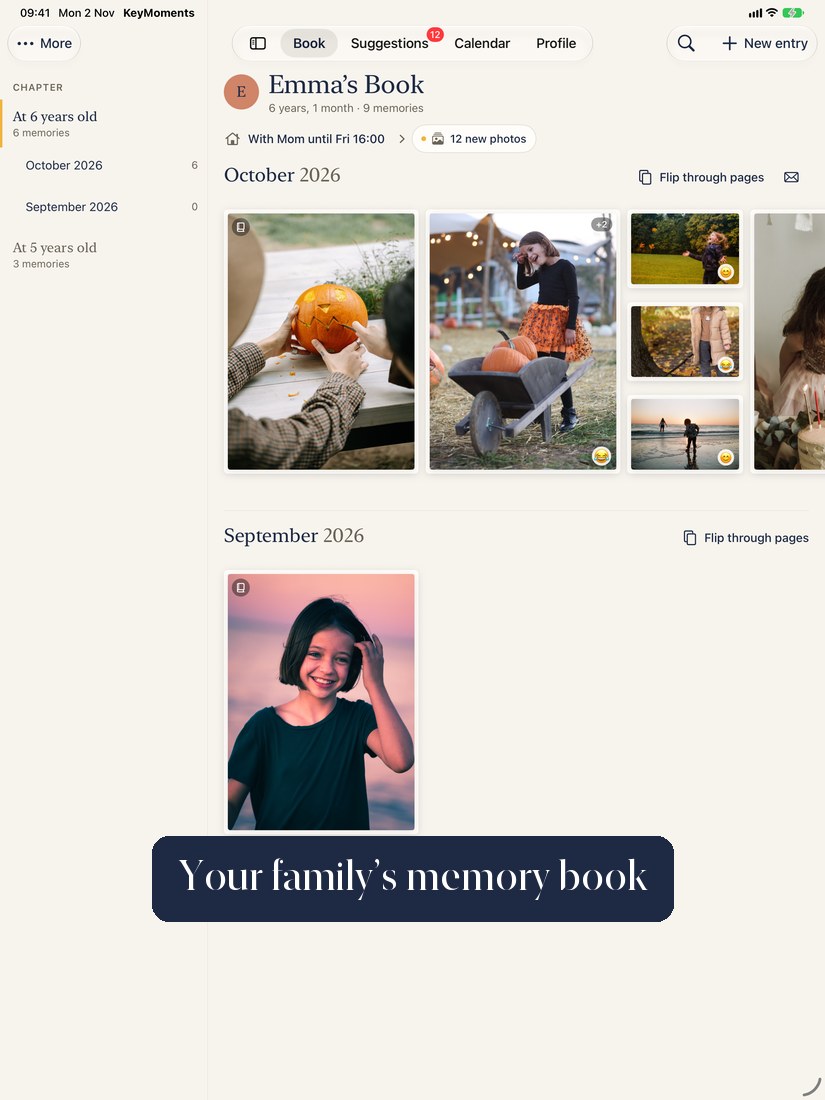
Calm and warm, with the photos in the centre: every month is a pinboard you swipe through. Moments with many photos, milestones and recaps are large, the rest sit smaller beside them. Every year of life is its own chapter that you flip through like a real book. On the iPad, the sidebar takes you to any month.
Recaps & stories
For months, years, trips and special days the app prepares a recap as a draft, with Apple Intelligence on your device, only from your entries, captions and notes, every sentence checked. The app can be wrong too, so you read it, change it, or tell it again with your own notes.
Say it instead of typing
Just talk and the app writes your story down. Laughter, songs and first words stay as recordings, with a transcript underneath, also for kid quotes, recognised on your iPhone and searchable.
Find it again by feeling
Give each moment a mood 😊 😂 🥹 and find it again by person, place, year of life, milestone or mood. See how a year felt, with the funniest and most touching moments at a glance. All on the device, with no cloud AI.
Calendar & custody schedule
Doctor, daycare, school and hobbies in a family calendar, as a month view or a list. For parents who live apart: a custody schedule (also as a PDF for daycare and grandparents) and a reminder before every handover. If you like, all appointments show up in your iPhone calendar.
Sealed letters for later
Write letters that stay closed until the 18th birthday. Everyone in the family writes their own.
Photo book & archive
Design a photo book as a PDF. For the birthday, the past year is ready and waiting. Or save the whole book as an archive that opens in any browser. Included in the plan.
Photo calendar
A wall calendar with your photos, one per month, with the children's birthdays and your important dates, as an A4 PDF. One-time purchase, no subscription, any number of calendars and years.
Pass memories on
Turn a memory into a pretty card for the family chat, or send a whole month as "Mail from your child", a PDF with 5 to 8 photos and your texts. Both are made on your device, and only when you tap.
Kid art
Scan your child's drawings with the camera. They sit on their own shelf sorted by age, and as an entry in the book. One-time purchase, no subscription.
Siblings at the same age
Emma at 2 and Noah at 2 side by side, plus height and weight in one shared chart. On the birthday, the slideshow of the past year opens if you like.
Kid quotes & interview
The funniest sentences with date and age, and the same 10 questions for your child every year to compare, with video if you like. "Voice then and now" plays all the recordings in a row.
Easy for grandma & grandpa
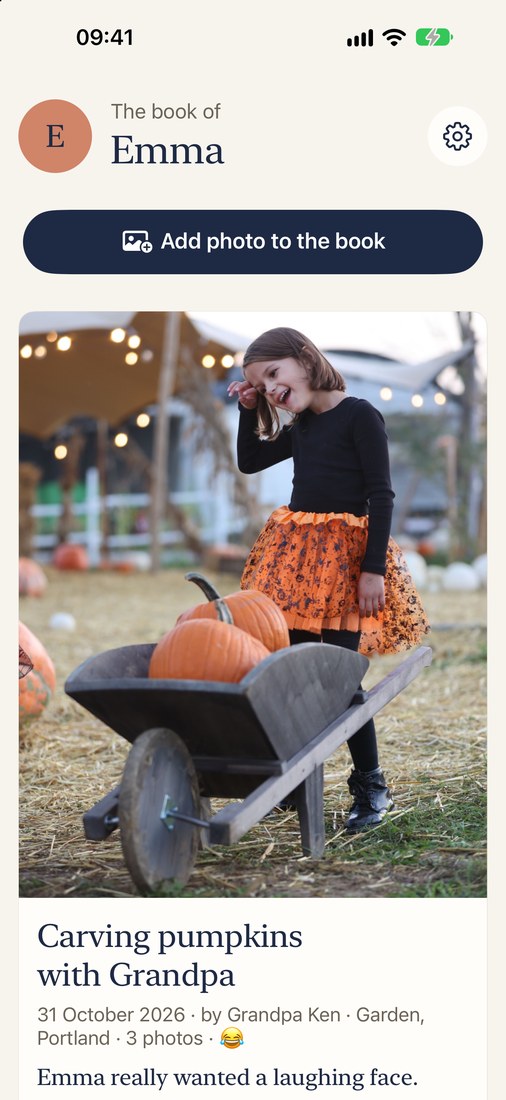
The simple view shows only the book: big photos, big text, "New" since the last visit, a heart and a comment, a read-aloud button, and if you like a big "Add a photo" button. A start card to print shows how to begin in three pictures.
Questions for the family
A new question for grandma, grandpa and everyone else each month: "What did you think when you first saw Emma?" The answers, ideally as voice recordings, stay in the book.
Height, weight & wishes
A growth chart, clothes and shoe size, and a wish list where grandma taps "I'll give this".
Comments & reactions
Grandma, grandpa and everyone invited react to new moments and add a few kind words.
Time-lapse & widget
One photo a week becomes a film, "grown up in 60 seconds". And "On this day" right on your home screen.
Slideshow on the TV
A year of life or the whole book as a slideshow with videos and your own music, on the TV via AirPlay or to share.
Live Photos & videos
Live Photos keep their motion: press and hold to play. Videos play right in the book, with sound. Edit like in the Photos app: crop, straighten, filters, light and colour, markup, key photo and effects for Live Photos, trim and mute videos. The original is always kept.
From any app into the book
A photo in Photos or WhatsApp, then Share, then KeyMoments. Plus Siri ("New moment in KeyMoments"), Lock Screen widgets and a Control Centre button.
Texts from your notes
A few words for each photo and the app turns them into a short sentence under the picture. Only from your facts and checked, but still give it a quick read. It also learns how your family writes. KeyMoments Plus with Claude writes fuller, more natural sentences if you want.
The app stays small
Photos and videos live safely in iCloud and load when you look at them. You decide how much stays on the device, and shared books take up little room.
Hand over a book
Transfer a book to the other parent or another invited person. All memories move with it, and the authors stay on record.
Backup as a file
Save all books as one encrypted file, and read it back in after a break or on a new iPhone.
Together with the family
Invite the other parent, grandma, grandpa or godparents. You decide who only looks and who adds entries.
- Rights per person: write, comment or only look, and if you like admins and approval of new entries before they show. People you invite can only change what they added themselves.
- Only you see the calendar and height & weight, unless you share them.
- The book can be transferred to the other parent, and all invitations stay.
- With their own phone your child can use the book from about age 12, with a private diary and a PIN if you like.
- From 16 your child takes over the book and decides who may see it.
- Light and dark, protected with Face ID, just like you know it from your iPhone.
Fair and simple
The first month is free and unlimited, with no subscription and no payment details.
First child
Every further child costs less, with a family discount for 2 or more children. Up to 6 children. Apple shows the price for your country before you subscribe.
Grandma, grandpa & co.
For people you invite, such as grandparents or the other parent. They see all the children they are invited to. Already included with their own child plan.
🎁 Grandparents can also give you a whole year, with no automatic renewal.
Yearly
Every plan is also available yearly, about 20 % cheaper. Your child themselves pay nothing.
Prices shown in euros are the reference for the euro area. In other countries Apple sets the local price.
✨ KeyMoments Plus (optional, try it with 100 Sparks free): captions, entries and stories written by the AI Claude in full, natural sentences, only with your consent. Every month 200 Sparks: one field costs 1, a recap 5 (a yearly recap 15) including all captions, and titles are free. You can also have existing texts, or the whole book, rewritten.
Private. Really.
Your child's memories belong in your family, not on strangers' servers. That is why KeyMoments has no sign-up: no account, no password, no user profile.
- No registration, no email address: your Apple ID is enough.
- Face recognition, stories, dictation and transcripts of voice recordings run on the iPhone itself.
- No cloud AI without your yes: Apple's AI writes the texts on your device, and the openly available face model SFace recognises faces, also only on the iPhone. Only if you switch on the optional add-on KeyMoments Plus and agree, do your notes, reduced-size photos (without GPS coordinates; for videos, stills and the spoken words as text) and the date, place, weather and recognised names in words go to the AI Claude. Never for training, and you can switch it off with a tap.
- Nothing to advertisers: We pass no photos and no data to advertising or analytics companies. To Claude only with KeyMoments Plus and your yes. We never see your photos ourselves.
- Stored in your own iCloud, text and media end-to-end encrypted.
- Backups are encrypted with your own password and stay with you.
- No ads, no tracking, no selling of data.
Frequently asked questions
What is KeyMoments?
A digital memory book for your child, for iPhone and iPad. Every child gets their own book with photos, videos, voice recordings, milestones and stories, from the first days to the 16th birthday, when your child takes over the book.
In the App Store the app is called "KeyMoments". It is sometimes written differently: Key Moments, Keymoments, Key-Moments. It is always the same app from key-moments.de.
What does KeyMoments cost?
The first month is free. After that the child plan costs €1.99 a month for the first child (in the euro area), and each further child costs less. People you invite, such as grandparents, pay for access, which is included in any child plan. Yearly plans are about 20 percent cheaper. Apple sets the price for your country and shows it before you subscribe.
Do I have to sign up?
No. No account, no password, no email address: your Apple ID is enough. You need iCloud for backup and sharing.
Can I take a look at an example first?
Yes. Our example shows what a full book looks like, with a made-up family. The pictures are made with AI and labelled as such.
Does KeyMoments work without iCloud?
Yes, but only on one device. Without iCloud there are no invitations to the family, no child access and no syncing with other devices. Your books then live only on this device: if you delete the app or lose the device, they are gone unless you made a backup. In the app you can create a backup file at any time.
Where are my child's photos stored?
In your own iCloud, text and media end-to-end encrypted. They load onto your device when you look at them, which keeps the app small. Face recognition and texts run on the device. No ads, no tracking.
Can grandma, grandpa and the other parent take part?
Yes. You invite them and decide who writes, who comments and who only looks. Grandma and grandpa see the books of all their grandchildren in one place, with a simple view with big photos and big text if you like.
Are photos of my children sent to an AI on the internet?
No, unless you explicitly want it. By default Apple's AI writes the texts on your device, and an openly available face model (SFace) recognises faces, also only on your device. Only with the optional add-on KeyMoments Plus and your consent do your notes, reduced-size photos without GPS coordinates (for videos, stills and the spoken words as text) and the date, place, weather and recognised names in words go to Claude, an AI from Anthropic, to write one text. Never for training, and our server stores none of it. Nothing ever goes to advertising or analytics companies.
What is KeyMoments Plus?
An optional add-on subscription. You can try it free with 100 Sparks . Then the AI Claude writes the captions under photos, titles, entries and recaps in full, natural sentences from your notes and what the photos show, even on iPhones without Apple Intelligence. Every month brings 200 Sparks : one field costs 1, a recap 5 (a yearly recap 15) including all captions, and titles are free. You can top up when you need more. Without Plus, the app writes the texts for free with Apple's AI on your device.
Is there KeyMoments for Android?
No, only for iPhone and iPad. Family members with Android can look at single moments through a link in their browser.
Can I print the photo book?
You make the photo book and the photo calendar as PDF files that you can print yourself or take to a print shop of your choice. The in-app links to German print partners are not part of the English version.